Cleaning up an S3 bucket with the help of Athena
Imagine your basement or attic would provide unlimited capacity for storing stuff. Sounds great? Maybe at first. But imagine how many stuff would pile up...
Imagine your basement or attic would provide unlimited capacity for storing stuff. Sounds great? Maybe at first. But imagine how many stuff would pile up over the years if you were not forced to clean up your stuff because of limited storage space every now and then. S3 (Simple Storage Service) offers unlimited storage capacity. And that is why data is piling up endlessly if you are not cleaning up unused data from time to time. You will learn how to detect unused objects within your S3 buckets in the following article.
S3 provides lifecycle management which allows you to define a lifetime for your objects. The life of an object starts with its upload and ends after the lifetime you have specified in days. In many use cases deleting files after a fixed period of time is not sufficient. For example, because some objects are downloaded regularly for years. Other objects are uploaded once and never downloaded again.
So how do you clean up files from your S3 bucket that have not been downloaded for a long period of time? By using the following building blocks:
- S3 Access Logs: writes every request to your S3 bucket into a log file.
- S3 Inventory: provides a CSV or ORC file containing a list of all objects within a bucket daily.
- Athena: allows you to query structured data stored on S3 ad-hoc.
We will use Athena to query the access logs and inventory lists from S3 to find objects without any read requests within the last 90 days.
Configuring S3 Inventory
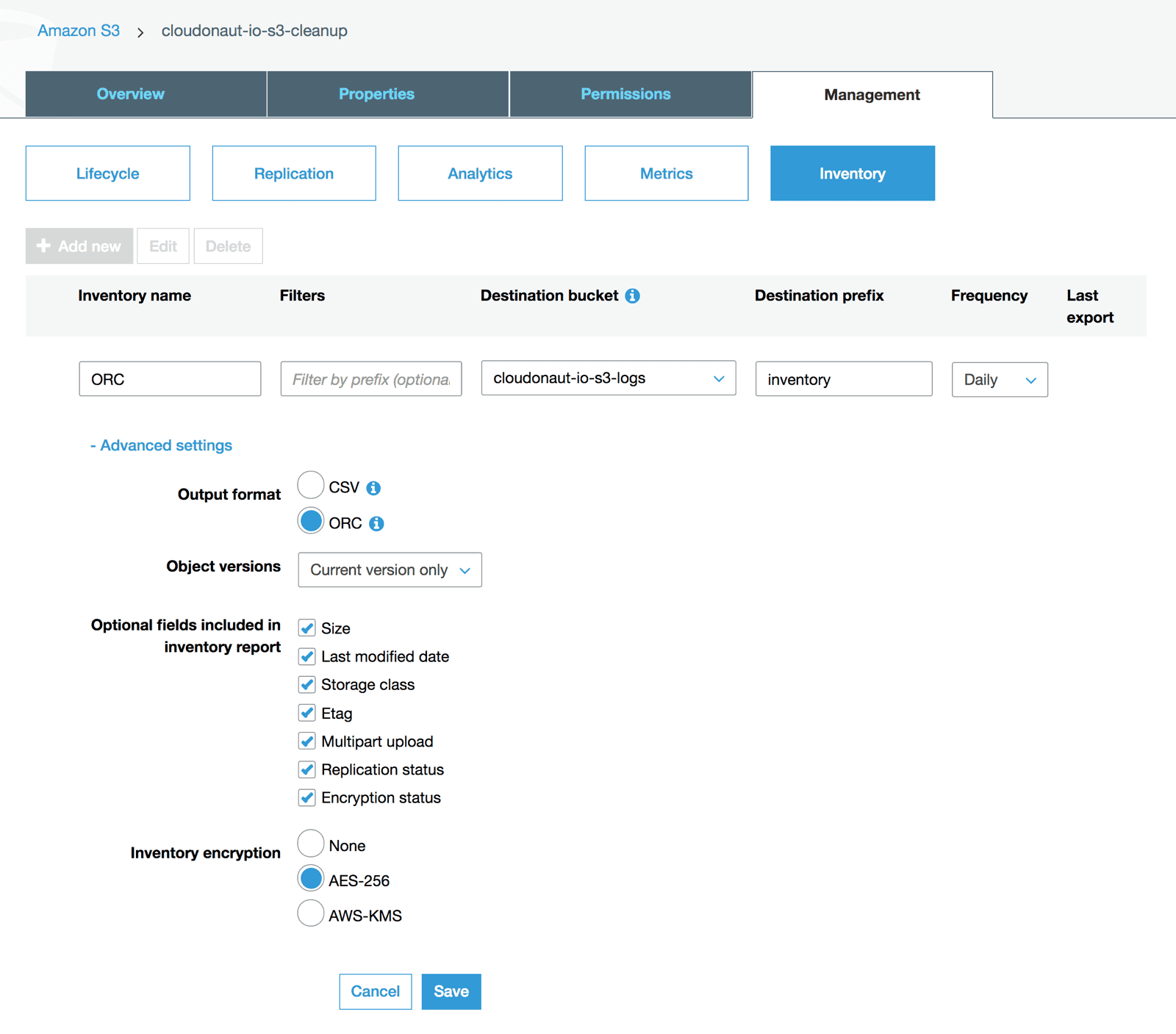
First of all, you should create a separate S3 bucket to store access logs and inventories, which I have named cloudonaut-io-s3-logs. Next, create a new inventory configuration for the bucket you want to clean up, cloudonaut-io-s3-cleanup in my example. The following screenshot shows the most important configuration options.
- Type in
ORCas inventory name. - Select the logs and inventories bucket,
cloudonaut-io-s3-logsin my example. - Type in
inventoryas the key prefix. - Select
dailyas the delivery frequency for the inventory. - Choose output format
ORCwhich is a perfect fit when analyzing data with Athena. - If versioning is not enabled for your bucket, choose
Current version only. - Select all optional fields, better safe than sorry.
- Server-side encryption with
AES-256is selected by default, as you export the encryption status.
Next, we need to set up the second data source: S3 Access Logs.
Configuring S3 Access Logs
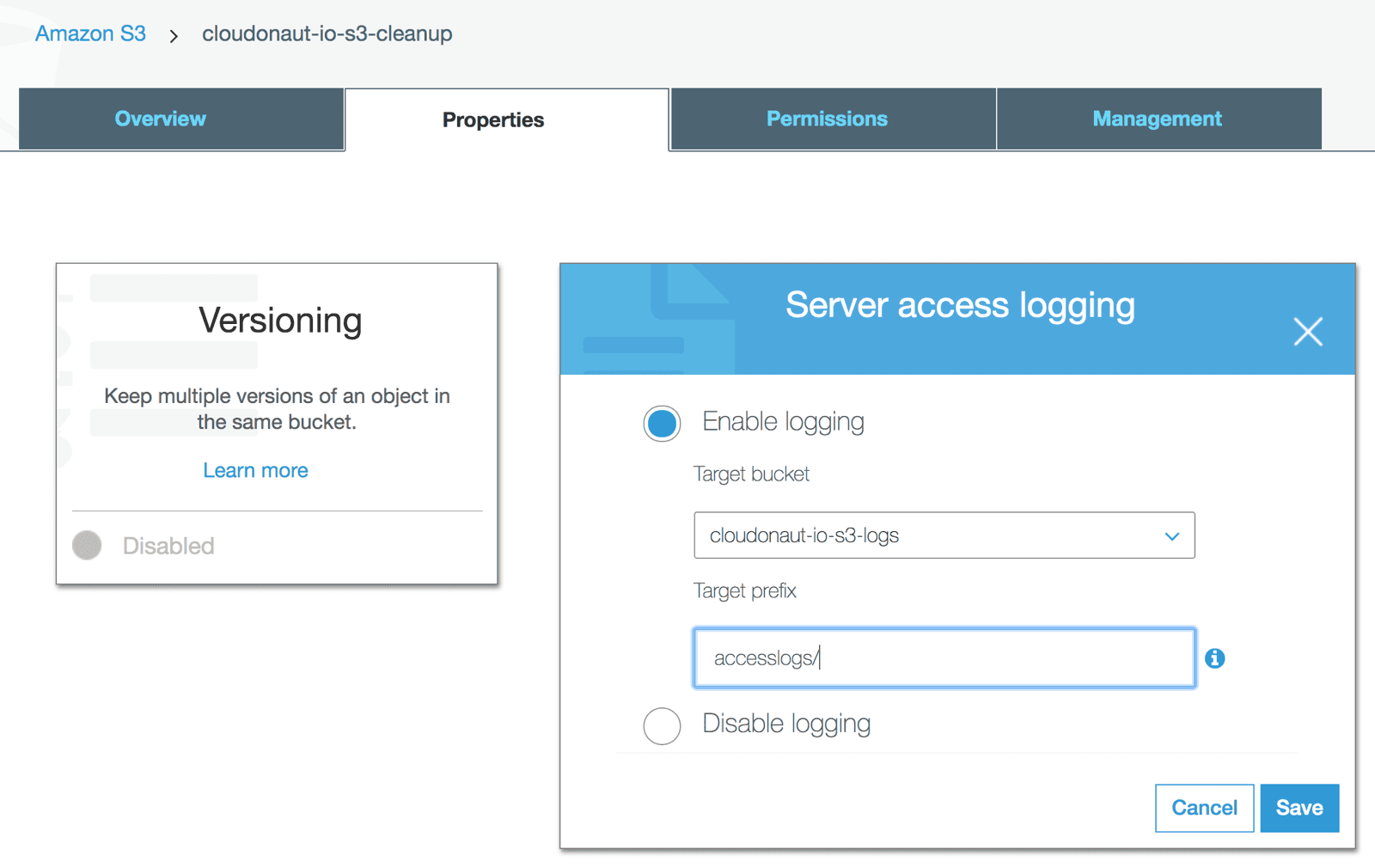
Enable Access Logs for the bucket you want to clean up, cloudonaut-io-s3-cleanup in my example.
- Select the logs and inventories bucket as target bucket, which is
cloudonaut-io-s3-logsfor me. - Choose
accesslogs/as the prefix for the log files.
It will take up to 48 hours until access logs and the inventory are available. It makes sense to stop here and wait until the needed data is available before proceeding with the next steps.
Creating Athena tables
Athena is a query service which we will use to query the access logs as well as the inventory. Athena executes ad-hoc queries on data stored on S3. To be able to query data tables we need to define temporary tables.
Open Athena’s Query Editor and run the following query to create the inventory table. The table accesses the inventory files stored on S3 in ORC format. You have to replace the name of the S3 bucket cloudonaut-s3-logs with your bucket containing the logs and inventories.
CREATE EXTERNAL TABLE inventory( |
The access logs are stored in CSV-alike files on S3. The following query will create the table containing the access logs. A regular expression is used to parse the S3 access log files with Athena. You have to replace the name of the S3 bucket cloudonaut-s3-logs with your bucket containing the logs and inventories.
CREATE EXTERNAL TABLE accesslogs( |